One login shows what your marketing costs, and what it brings in.
Every engagement with us runs in Prism, a workspace you log into from day one. It puts what each channel cost next to the leads your sales team accepted, keeps every request and decision in one place, and says plainly when a number cannot be trusted. Where we run your sales pipeline too, Bond tracks each lead from first contact to customer.
Included in every engagement · Senior reply inside 48 hours · Never sold on its own
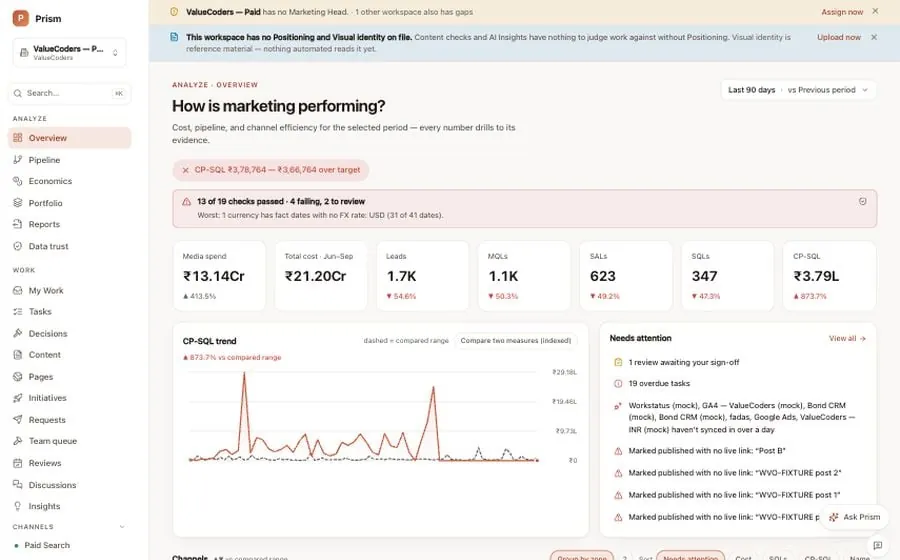
Prism · OverviewLast 90 days · sample data
In one answer
Prism and Bond are the two systems every PixelCrayons engagement runs in. Prism shows what marketing cost, what it produced and what we decided. Bond shows what each lead became once sales picked it up. You get a Prism login with the kickoff. Your requests, the approvals waiting on you, the tasks with their owners, the weekly review and every decision live there, with the history kept. Bond appears only where we run a pipeline for you. Neither is sold, licensed or charged for: the workspace is part of the work.
What it is
Two systems, one loop.
Prism is where marketing is run and judged. Bond is where sales works the leads. Prism decides what to do next; Bond tells it what happened. Each page below explains one of them in full.
Prism
The marketing workspace
Evidence
Decision
Action
Prism connects your ad accounts, analytics and search data, adds the cost of the people and tools behind them, and puts the total next to the leads sales accepted. Every review ends in a decision with an owner, an expected result and a date to check it. You log in and see all of it.
Bond is the CRM our team uses when we run demand generation into a sales team. A lead counts once a salesperson accepts it, every deal sits in a stage with a value, overdue follow-ups surface on their own, and won or lost outcomes go back to Prism without the customer's identity.
Ask Prism answers questions from the workspace's own data and points at what needs attention. It never changes anything on its own. Every decision is recorded by a named person on our team.
Every action is kept
Requests, approvals, tasks and decisions carry their history. When a decision comes back for review, it is judged against what we said would happen.
What you see
Real screens, sample data.
These are the screens you log into, captured from a demo workspace with sample data so nothing here is a client's number. Your workspace looks the same with your channels in it.
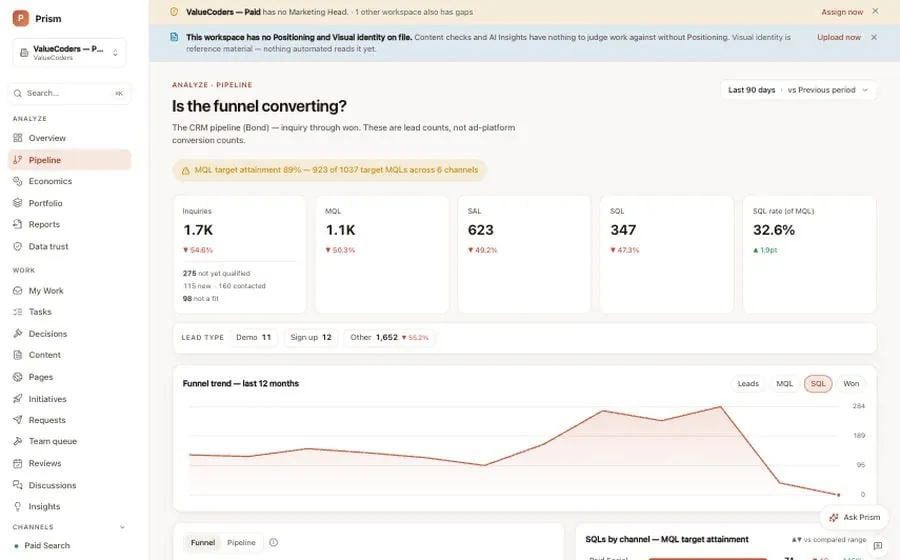
Pipeline: the funnel from enquiry to won, counted in the sales team's stages, not in ad-platform conversions.
Prism · Pipeline · Sample data from a demo workspace, not a client's numbers
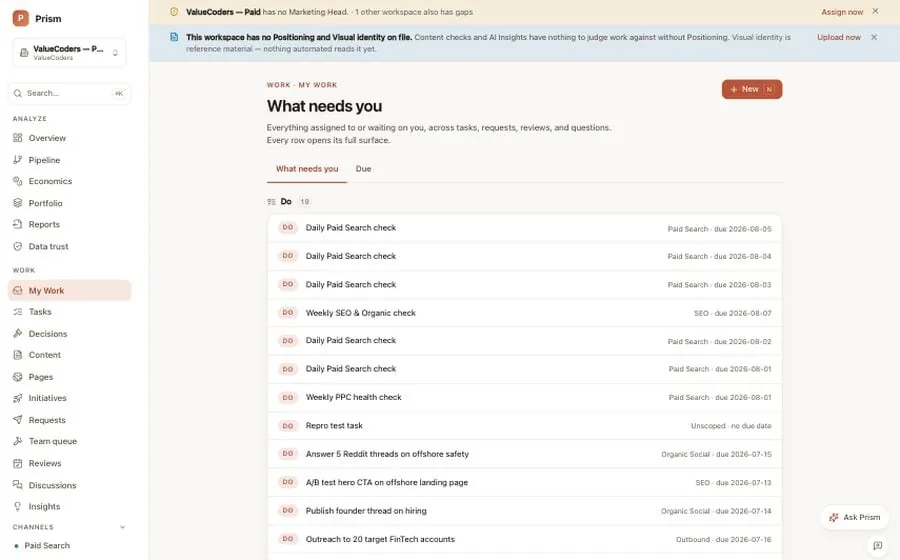
My work: everything waiting on you, in one list, each item with its channel and due date.
Prism · My work · Sample data from a demo workspace, not a client's numbers
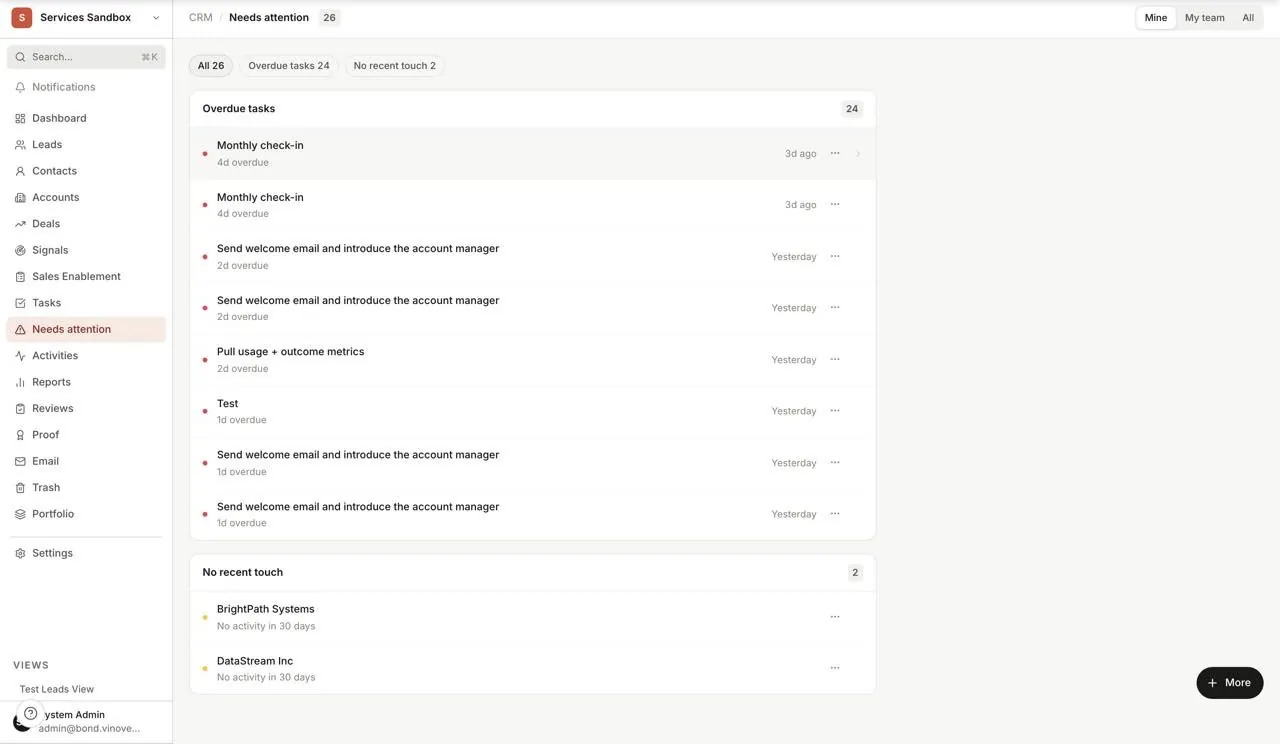
Bond, Needs attention: overdue follow-ups and accounts gone quiet, surfaced without anyone having to remember.
Bond · Needs attention · Sample data from a demo workspace, not a client's numbers
What you get
A login, not a report.
01
A Prism workspace of your own
Your login lands with the kickoff. Everything about the engagement lives there, visible without asking for it.
Every engagement
02
Requests in one queue
You raise a request in the workspace, not in an email thread. It gets an owner, a status and a place in the plan.
Every engagement
03
Approvals you can see
Anything that needs your sign-off waits in a visible approval state, with what it is and why, so nothing ships on an assumption.
Every engagement
04
Tasks with owners
Work is a named task with an owner and a history, not a line in a status email. You can see what moved and what did not.
Every engagement
05
The weekly review
Cost, leads and the verdict for each channel, reviewed every week, with last week's version kept beside it.
Weekly
06
Decisions with a check date
Every decision records what we expect to happen and when we will check. When the date comes, it is judged against that expectation.
Every engagement
07
Bond, where we run pipeline
If we run demand generation into a sales team for you, Bond tracks each lead from first contact to customer and hands the outcome to Prism.
Pipeline engagements
What it does for you
Four things change when the work runs here.
01
You stop asking for updates
The workspace is the update. Log in and the week is laid out: what moved, what is waiting on you, what we decided and why.
02
Budget follows accepted leads
A channel is judged on the leads your sales team agreed to work, not on clicks or form fills. Money moves towards what sales actually wanted.
03
Nothing gets lost in a thread
A request becomes a task with an owner. A decision gets a check date. When the date comes, the result is compared with what we promised.
04
You know which numbers to trust
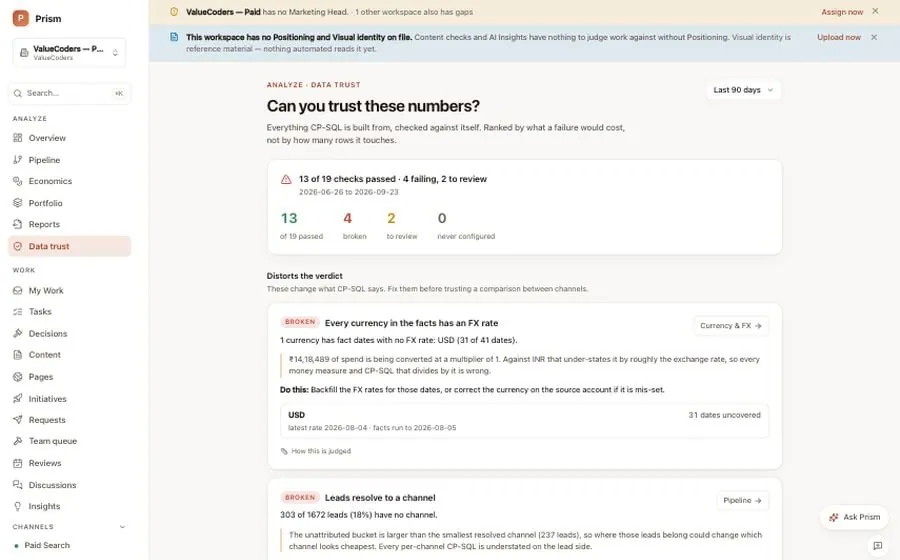
Prism runs its own data checks. A stale sync, a missing exchange rate or an unattributed lead is flagged on the figure it affects, in plain words.
The rule that makes it different
When Prism cannot defend a number, it says so.
Most reporting fills gaps. A channel with no cost attached looks efficient. A lead nobody attributed gets handed to whichever source was nearest. The chart stays smooth and the decision underneath it goes wrong.
Prism keeps the gap. Unmeasured spend shows as unknown, never zero. An unattributed lead stays unattributed. Every figure carries one of three states, and the state travels with the number into the review.
You can plan around a known gap. You cannot plan around a zero that is lying to you.
Data trust: nineteen checks on the numbers behind cost per SQL, ranked by what a failure would cost, each with what to do about it.
Prism · Data trust · Sample data from a demo workspace, not a client's numbers
Measured
Both the cost and the leads were recorded at the level you asked for.
Partial
One side was recorded, the other estimated or shared out, and it says so.
Unknown
Not measured. Shown as unknown, left out of the ratio, never written as zero.
Compared with what you have
A PDF describes. A dashboard displays. A workspace decides.
The difference is what happens next, not how nice the chart is. Only one of these turns a finding into an owned task and brings it back to be checked.
Mechanism
Monthly PDF
Live dashboard
Prism workspace
What it shows
Last month, summarised
Activity, as it happens
Cost beside accepted leads, each figure with its state
When you see it
Weeks after the fact
Whenever you look
In a weekly review, with last week kept beside it
Missing data
Left out or footnoted
A zero or a flat line
Shown as unknown and kept out of the ratio
What happens next
A call, then a thread
Nothing, until someone acts
A recorded decision with an owner, an expectation and a check date
Who did what
Not recorded
Not recorded
Every action kept and later checked against its outcome
Your requests
Email
Not part of it
A queue with owners, approvals and status
How it fits
Part of every engagement. Never a licence.
Prism and Bond are proprietary Vinove operating infrastructure and are not licensed standalone. You cannot buy them and we do not charge for them: the workspace comes with every engagement, from a one-off build to a retainer to a dedicated team. Bond is present only where we run pipeline for you. The rate card lists the inclusion; the proposal names your workspace.
Every service, solution and hire page carries an Inside Prism band. The rate card lists the workspace as an inclusion. The free website review is the first thing that lands in it.
You get a login. Every engagement comes with a Prism workspace of your own: your requests, the approvals waiting on you, the tasks with their owners, the weekly review and every decision with its expected result. We work in the same workspace you read, so there is no separate report to reconcile against what happened.
No. A dashboard shows activity and leaves the decision to you. Prism is where the decision is made, recorded and turned into a task with an owner. Week to week you read one review: what each channel cost, what it produced, the verdict and the caveats. If you have a question, you type it into Ask Prism and get an answer from your own data.
One row per channel: what it cost, fully loaded where you have shared the cost; what it produced, counted in leads your sales team accepted; the state of each figure, measured, partial or unknown; and the verdict, recorded with what we expect to happen and when we will check. Last week's row sits beside this week's. Under the rows: the decisions taken, the tasks that moved and the caveats that need a decision from you.
Media spend comes from the connected ad accounts. For the fully loaded number it also wants the people, tools, retainers and any shared cost you allocate to marketing. You choose how much to share. Whatever is missing shows as unknown against that channel rather than being guessed, so the ratio is never quietly flattered.
A sales-qualified lead, an SQL, is a lead the sales team accepted as worth working. It is the number because it is the first point where someone other than marketing has judged the demand. Clicks, sessions and form fills are inputs; a channel is judged on what it put in front of sales and what sales agreed to take. Where we run the pipeline, Bond records that acceptance. Where we do not, your sales team's own acceptance is the figure Prism reads.
No. Prism records tasks, decisions and outcomes, not hours, and it is not a time-tracking tool. What you see is whether the work that was supposed to happen did, who owned it and what it produced. Hours are not a measure we report through it.
Only where we run pipeline for you: demand generation into a sales team, with a sales-acceptance step. Then Bond tracks each lead from first contact to customer, records what sales accepted or returned, and hands the outcome back to Prism. On a build, a design or a search engagement with no pipeline to run, Bond does not appear.
No. Both are proprietary Vinove operating infrastructure, not products, and neither is licensed or sold on its own. They come with the work: the workspace is part of every engagement and there is no line for it on the rate card, because it is not an extra.
Ask Prism sits on every screen and knows what you are looking at. Ask why a number dropped, how this week compares with last, or which campaign is wasting money, and it answers from the workspace's own data and shows its reasons. The Insights screen lists what it noticed on its own, each finding citing the numbers behind it. It never publishes, moves budget or changes anything; a named person records every decision.
Yes. They are captured from a demo Prism workspace and a Bond sandbox workspace, cropped to fit, and every one carries sample data rather than a client's numbers. The caption under each screen says so. Your workspace looks the same with your channels, your team and your figures in it.
Because an estimate that looks like a measurement gets treated like one. When a shared cost is unknown, Prism says so and keeps it out of the cost-per-SQL ratio, with the caveat attached to the figure. You decide whether to allocate it. A number with its assumptions showing is one you can act on; a smooth number with a hidden hole is not.
See it with your site in the picture.
Start with the free website review: a senior strategist records five minutes on your site and replies inside 48 hours. Want to see the workspace first? Book a walkthrough and we will screen-share a live one.
Reply inside 48 hours · Free · No retainer required
Last updated
May we run analytics (Google Analytics via Google Tag Manager) to see which pages are useful? Nothing loads unless you accept, and declining means no analytics script runs at all. No advertising cookies either way. Cookie policy · Privacy policy