
See what every channel costs,
and what it brings back.
Prism connects your ad accounts, analytics and search data, adds the people and tools behind them, and puts the total next to the leads your sales team accepted. Every weekly review ends in a decision with an owner and a check date. When a number cannot be trusted, Prism says so instead of guessing.
Every engagement runs in it · You get a login · Not licensed standalone
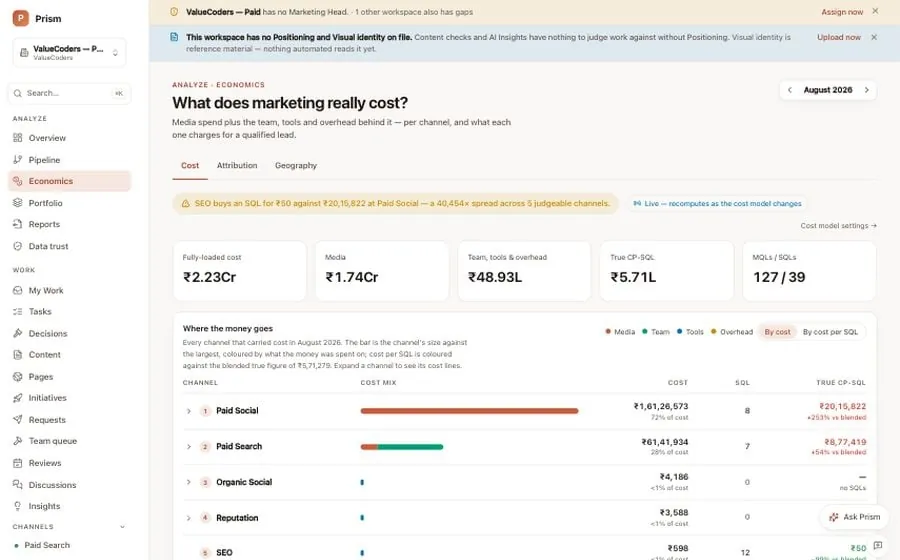












Prism is the marketing workspace where cost, accepted leads, reviews, decisions and tasks live together, and where you log in to see all of it. Every PixelCrayons engagement runs inside it. Sources connect, cost is loaded in full, a weekly review ends in a verdict, the verdict becomes a task with an owner, and the task comes back to be judged against what was expected. It is proprietary Vinove operating infrastructure, included in the work and never sold on its own.
A dashboard describes activity.
Prism has to improve a decision.
Accepted leads are the verdict
Clicks, sessions and form fills are inputs. The number Prism judges a channel on is the leads your sales team accepted, because those are the only leads that can become revenue.
Missing cost is not free performance
A channel with no cost recorded is not efficient. It is unmeasured. Prism shows the ratio as unavailable rather than making the channel look efficient.
Cost includes the people and the tools
Media is the visible part. The team's time, the tools and a share of overhead are added too, so the cost per lead is the cost you actually paid.
Cost per accepted lead,
with its assumptions showing.
Media + people + tools + retainers + allocated shared cost
Sales-qualified leads
Cost per SQL
An SQL is a sales-qualified lead: a lead the sales team accepted as worth working, not a form fill. Each side is totalled at the level you asked for before the two are joined. Spend is never multiplied by the number of lead records, and an unknown on either side stays visible in the result.
The screens you log into,
one by one.
Captured from a demo workspace with sample data. Your workspace has the same screens with your channels, your team and your numbers in them.
- 01Prism · Overview
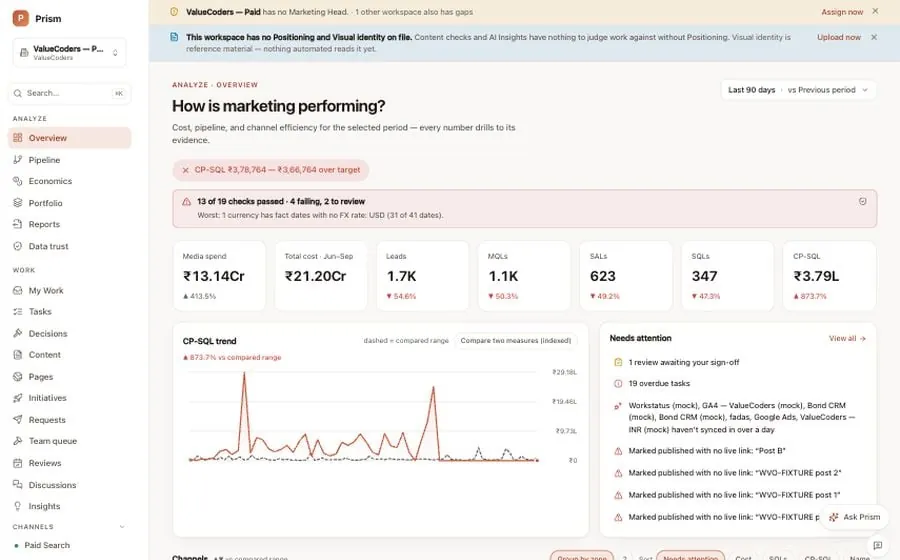
Overview: how is marketing performing?
The first screen after you log in. One verdict at the top, cost per accepted lead against its target, then the tiles: media spend, total cost, leads, MQLs, SALs, SQLs. A trend line shows the last ninety days against the period before. Beside it, the needs-attention list: reviews waiting on someone, overdue tasks, connections that have not synced. Below the fold, every channel in a row with the same columns, so paid search and SEO are judged the same way.
One screen answers the question everyone asks first, and every number on it drills down to its evidence.
Sample data from a demo workspace, not a client's numbers - 02Prism · Pipeline
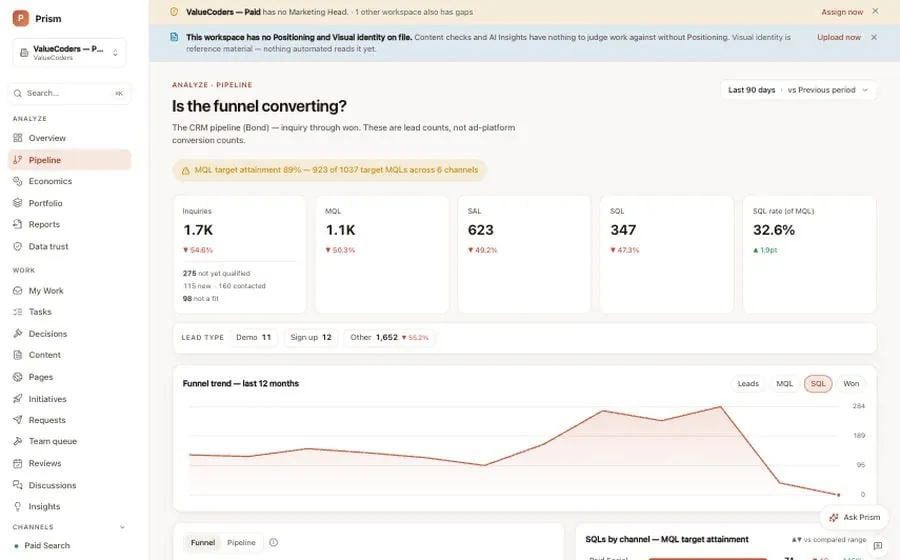
Pipeline: is the funnel converting?
The sales funnel as your sales team counts it: enquiries, MQLs, SALs, SQLs and won, by channel and by country. These are lead counts from the CRM, not ad-platform conversions, so a channel that fills forms nobody accepts shows up as exactly that. The twelve-month trend and the per-channel target attainment sit on the same screen, and each row opens the actual leads behind it.
A channel is measured on what sales accepted, not on what the ad platform reported.
Sample data from a demo workspace, not a client's numbers - 03Prism · Insights
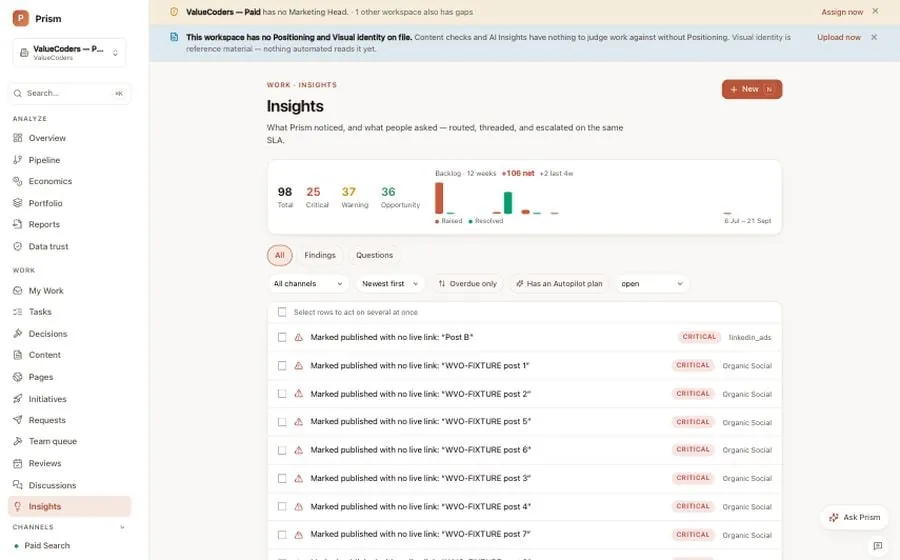
Insights: what Prism noticed
A running list of findings Prism raised on its own: cost per lead above target for a campaign, conversions down week over week, content marked published with no live link, a keyword with a low quality score. Each one is graded critical, warning or opportunity, names the channel, and cites the numbers behind it. Items are routed to an owner and tracked to resolution, so a finding is not a notification you close, it is work someone answers for.
Findings come with evidence and an owner, so the review starts from what changed rather than from a blank page.
Sample data from a demo workspace, not a client's numbers - 04Prism · Ask Prism
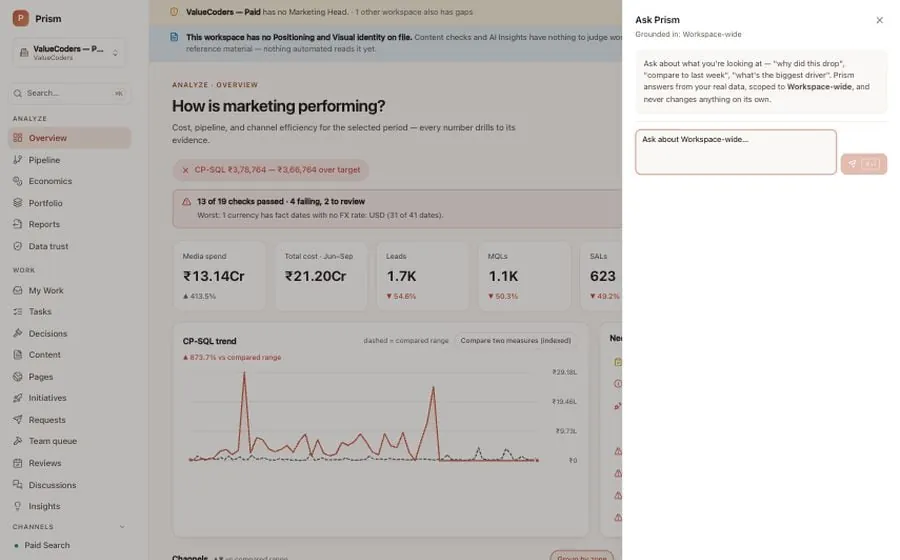
Ask Prism: type the question
A panel that opens on any screen and knows what you are looking at. Ask why a number dropped, how this compares with last week, or which campaigns are wasting money, and it answers from the workspace's own data, scoped to the channel or the whole workspace. It answers and explains. It never changes anything on its own, and it is not a substitute for the named person who records each decision.
You ask in plain words and get an answer from your real numbers, not a generic summary.
Sample data from a demo workspace, not a client's numbers - 05Prism · Portfolio
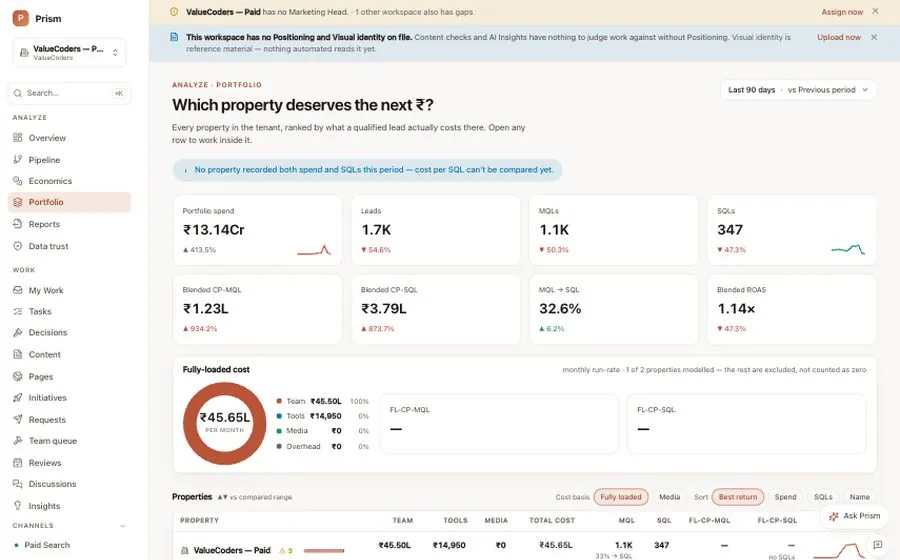
Portfolio: which property deserves the next rupee?
For a group that runs more than one brand or workspace, every property sits side by side on the same verdict, cost per accepted lead, with its spend, leads and fully loaded cost breakdown by team, tools, media and overhead. Where a property has not recorded both its spend and its accepted leads for the period, Prism says the comparison cannot be made yet rather than ranking it on half a number.
Leadership sees every brand judged the same way, and a property with a gap in its data is named, not ranked.
Sample data from a demo workspace, not a client's numbers - 06Prism · Ads console
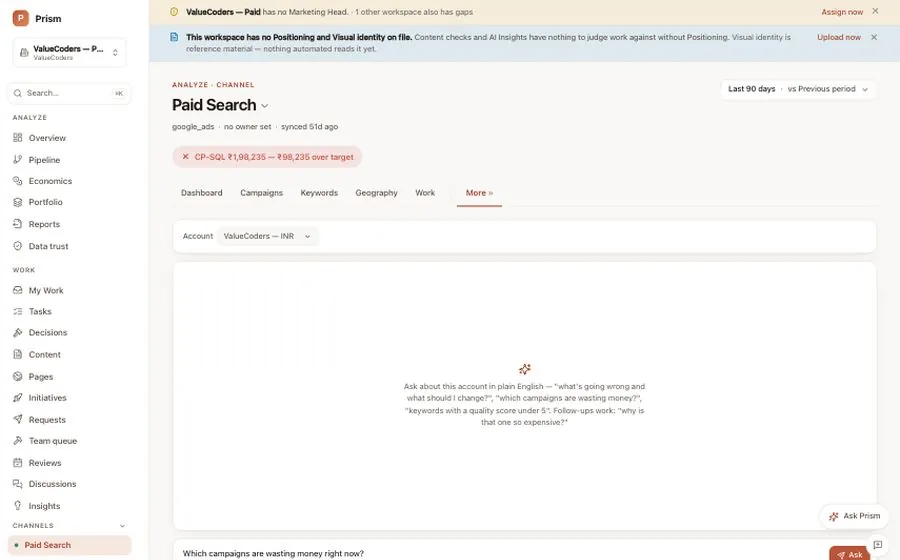
Ads console: ask the account a question
Each paid channel has its own screen with the campaigns, keywords, geography and device breakdowns, and a console where you type a question in plain English: which campaigns are wasting money right now, which keywords have a quality score under five, why one of them is so expensive. Prism turns the question into a query against the live ad account and answers with the rows, so nobody builds a report to get there.
A question about the ad account gets an answer from the ad account, not a screenshot of a dashboard.
Sample data from a demo workspace, not a client's numbers - 07Prism · Data trust
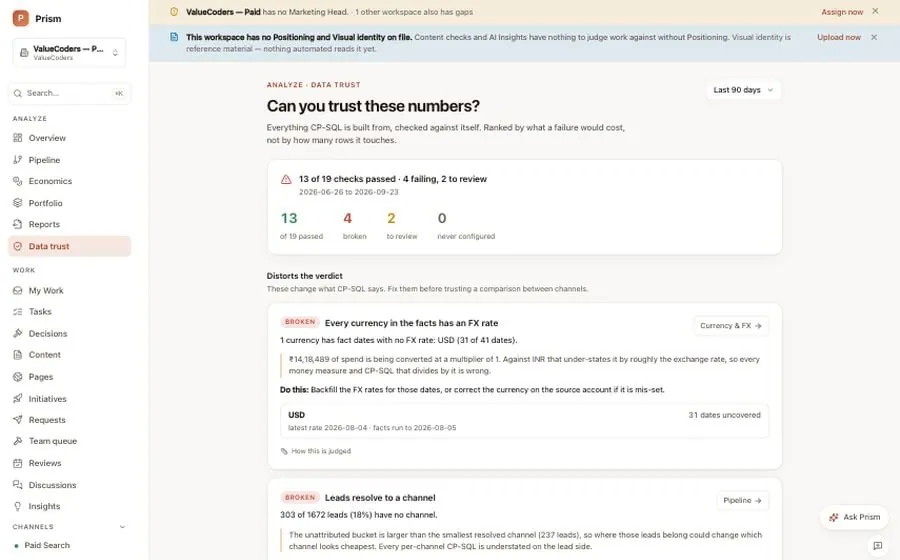
Data trust: can you trust these numbers?
Prism checks its own data before you read it. Nineteen checks run against the figures that cost per lead is built from: every currency has an exchange rate, every lead resolves to a channel, every lead carries a funnel stage, cost is only charged to channels that did something, no connection has gone stale. Each failure is ranked by what it would do to the verdict, explained in plain words and paired with what to do about it.
A number is never shown with false confidence: the check that would change it is listed right there.
Sample data from a demo workspace, not a client's numbers - 08Prism · Data sources
Data sources: what Prism connects to
One settings page lists every platform Prism reads from: Google, Microsoft, Meta and LinkedIn Ads for advertising, Google Analytics 4, Search Console and Ahrefs for search, email and outbound tools, Google Business Profile for reputation, and Bond for the CRM funnel. Each card shows whether it is connected and when it last synced, and the sync log underneath shows every run, including the failed ones.
Every source is visible with its last sync, so a missing day is a known gap and not a silent one.
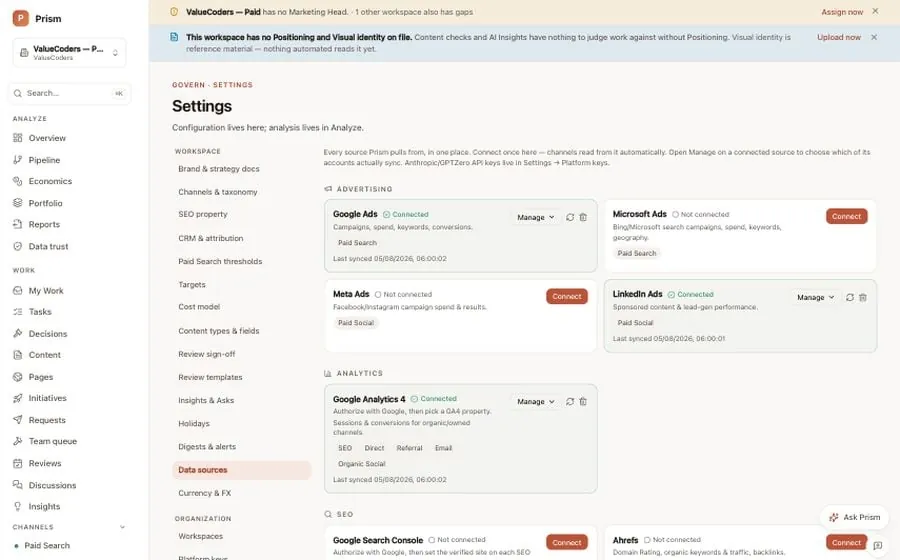
Sample data from a demo workspace, not a client's numbers
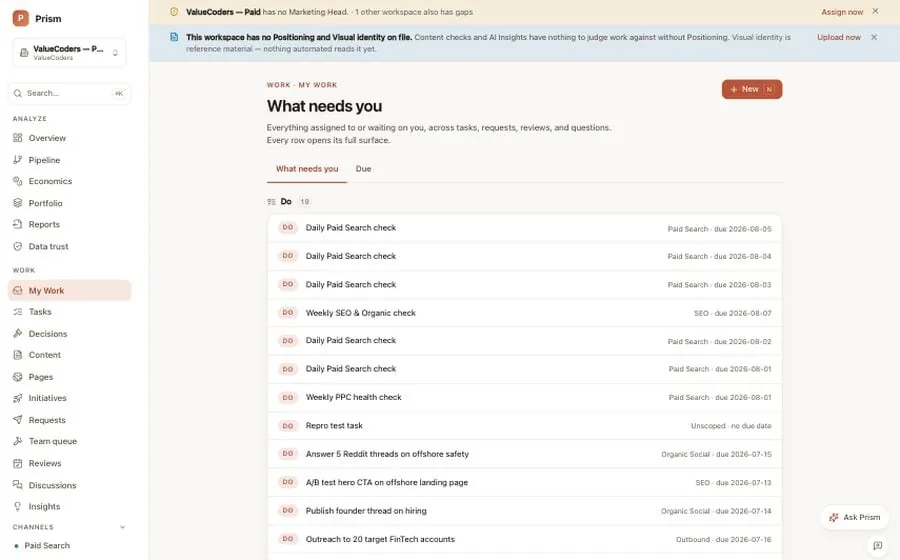
My work: what needs you, across tasks, requests, reviews and questions, each with its due date.
Prism · My work · Sample data from a demo workspace, not a client's numbers
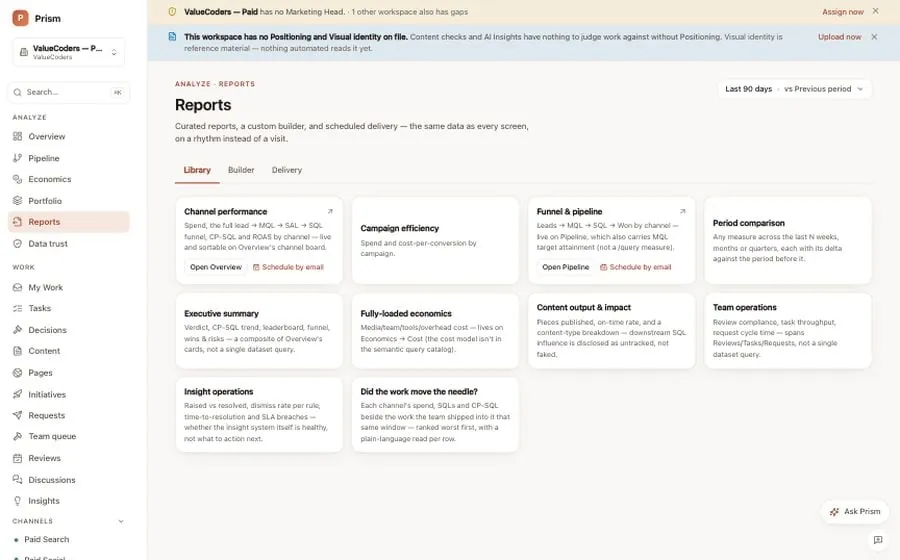
Reports: curated summaries and a builder, scheduled by email so nobody assembles a deck by hand.
Prism · Reports · Sample data from a demo workspace, not a client's numbers
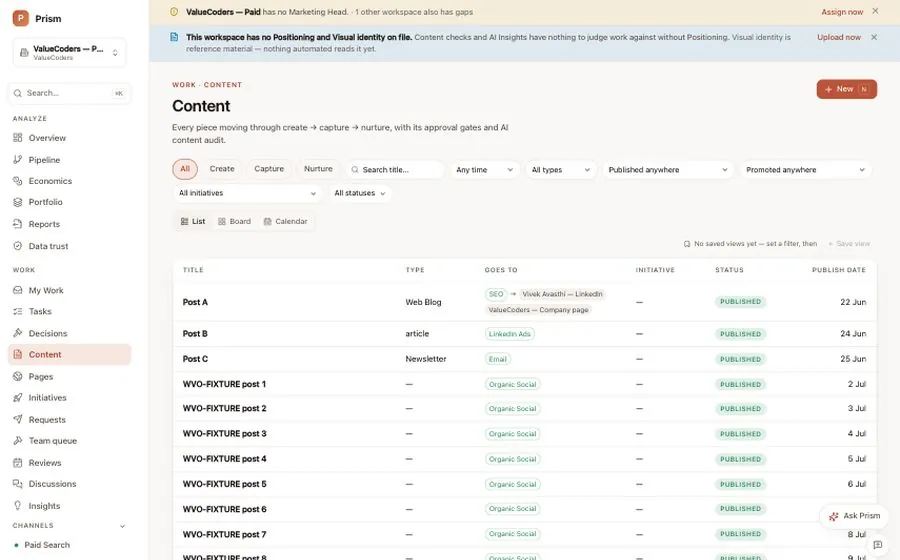
Content: every piece tracked from brief through publish to performance, with a live-link check.
Prism · Content · Sample data from a demo workspace, not a client's numbers
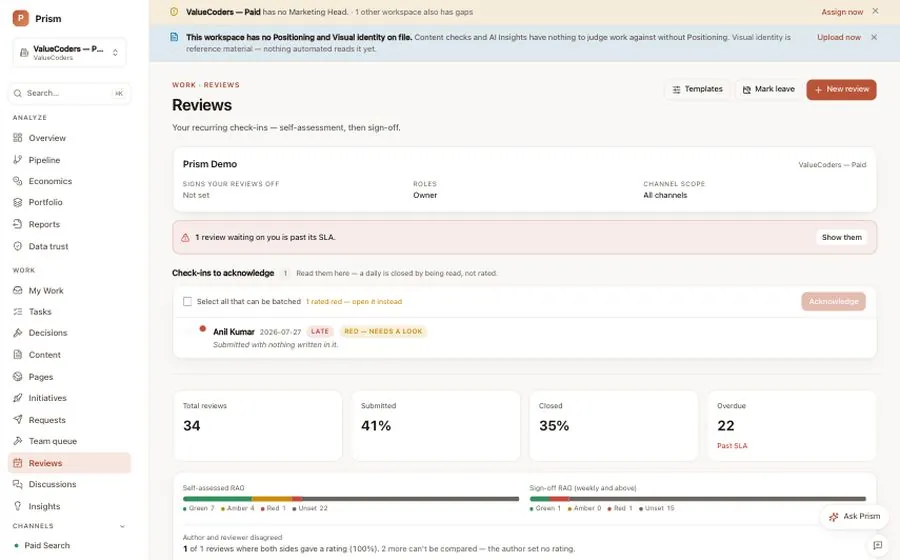
Reviews: scheduled check-ins per property, channel and person, so nothing goes unreviewed quietly.
Prism · Reviews · Sample data from a demo workspace, not a client's numbers
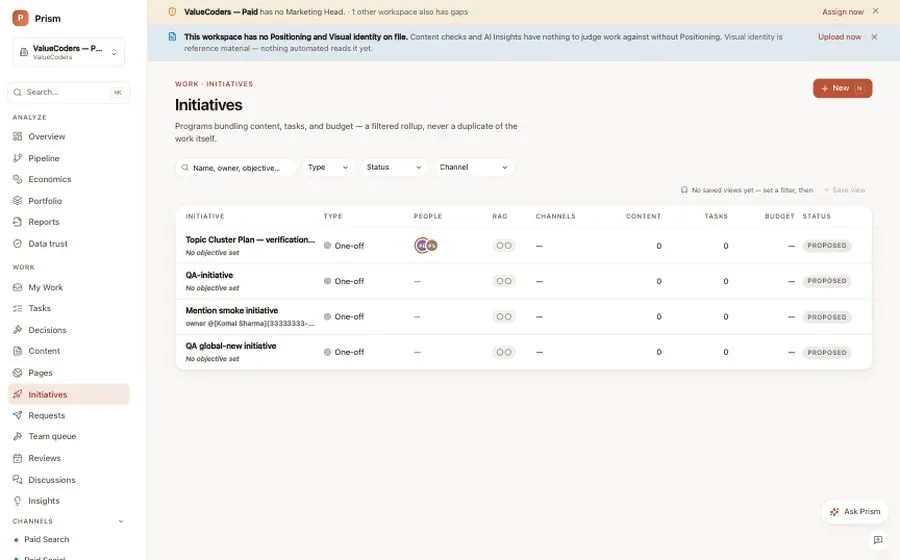
Initiatives: programmes with phases and milestones, progress derived from the tasks underneath.
Prism · Initiatives · Sample data from a demo workspace, not a client's numbers
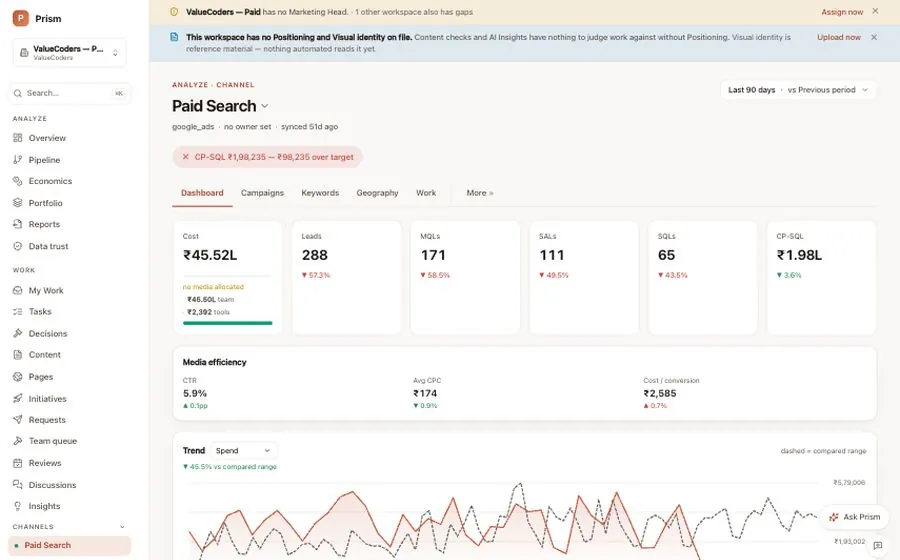
A channel screen: one paid account's verdict, campaigns, keywords and geography in one place.
Prism · Paid search · Sample data from a demo workspace, not a client's numbers
Connect, review, decide,
then check.
Seven steps, in order, every cycle. The last one feeds the first, so a review never starts from a blank page.
- 01
Connect
Ads, analytics, search, email and Bond feed one workspace.
- 02
Clean
Every source lands in one governed layer, so a lead means the same thing everywhere.
- 03
Review
Daily and weekly reviews on a set rhythm, with the previous answers kept.
- 04
Decide
The review ends in a verdict, recorded with what we expect and when we will check.
- 05
Do
The decision becomes an initiative, a task with an owner or a recurring routine.
- 06
Measure
Accepted leads and outcomes come back against the expectation.
- 07
Learn
What happened feeds the next review, so the loop starts from evidence.
Numbers, judgement and work,
in one place.
Connected sources
Advertising, analytics, search, email and Bond connect once. A stalled sync is flagged on the figure it affects, not hidden.
Daily and weekly reviews
Structured check-ins with self-assessment and sign-off. What was asked last time is kept, so a review is never a blank page.
Initiatives
Programmes that tie content, budget, phases and milestones together, with progress derived from the tasks underneath them.
Tasks and routines
Recurring work becomes real tasks with owners, checklists and history. If it was supposed to happen, you can see whether it did.
Decisions
What was decided, what was expected, when the result comes back for review. Judged against the expectation, not the mood in the room.
Data-trust checks
Stalled syncs, missing exchange rates, unallocated cost and attribution gaps surface as visible caveats on the figure they touch.
When Prism cannot defend a number,
it says so.
No measured spend does not become zero cost. An unattributed lead is not quietly handed to the nearest channel. A missing signal stays part of the answer, because you can plan around a known gap and you cannot plan around a confident error.
- MeasuredBoth the cost and the leads were recorded at the level you asked for.
- PartialOne side was recorded, the other estimated or shared out, and it says so.
- UnknownNot measured. Shown as unknown, left out of the ratio, never written as zero.
Prism and Bond are proprietary Vinove operating infrastructure and are not licensed standalone.
Frequently
asked.
Prism is the marketing workspace every PixelCrayons engagement runs in: connected sources, fully loaded cost beside the leads sales accepted, weekly reviews that end in a recorded decision, tasks with owners, and an assistant that answers questions from your own data.
Media, people, tools, retainers and whatever share of overhead you allocate to marketing. Media comes from the connected accounts; the rest you allocate at the level you choose. Anything not allocated shows as unknown against the channel, so a channel is never made to look efficient by leaving its cost out.
Your analytics tell you what happened. Prism puts what happened beside what it cost and what sales accepted, then ends the review with a decision that has an owner, an expected result and a check date. The analytics stay connected as a source. Prism is where the decision lives.
Google Ads, Microsoft Ads, Meta Ads and LinkedIn Ads; Google Analytics 4, Google Search Console and Ahrefs; email and outbound tools; Google Business Profile; and Bond for the CRM funnel. The Data sources screen shows each connection, whether it is live and when it last synced. If you use a platform that is not on the list, tell us and we will say whether it can be connected before you commit.
Only if you want the ratio to be complete. Prism works with whatever you share and marks the rest unknown, with the caveat attached to the figure. Many clients start with media only and add allocations once they have seen how the review reads. The choice is yours and the gap is always visible.
A person. Ask Prism answers questions and the Insights screen lists what Prism noticed, each finding with its evidence. Neither changes anything on its own. The decision is recorded by a named person on our team, and it is that person who answers for it when the check date comes.
No. Prism is proprietary Vinove operating infrastructure and is not licensed or sold standalone. PixelCrayons runs every engagement inside it and gives you a login as part of the work. There is nothing to buy and no line for it on the rate card.
The rest of
the loop.
Your site,
reviewed first.
A senior strategist records a five-minute review of your site and replies inside 48 hours. Want to see Prism before that? Book a walkthrough and we will screen-share a live workspace.
Reply inside 48 hours · Free · No retainer required
Last updated