
A lead counts when sales accepts it,
not when a form is filled.
Bond is the sales pipeline our team works in when we run demand generation into a sales team for you. Every lead has a status, a source and an owner. Every deal sits in a stage with a value. Overdue follow-ups surface on their own. What each lead became goes back to Prism, without the customer's name.
Where we run pipeline · Outcomes go to Prism · Customer identity stays in Bond
















Bond is the CRM we run a client's pipeline in: it records what each lead became, who owns the next step and what evidence supports the numbers. PixelCrayons uses it where we run demand generation into a sales team, so the leads our marketing produced are judged by whether sales accepted them and what they turned into, not by a form fill. Won, lost and retained outcomes go back to Prism. Names, emails and deal values do not. Bond is proprietary Vinove operating infrastructure and is never sold on its own.
A CRM should not give a reassuring answer
when the evidence does not exist.
No data is not zero
Missing evidence is shown as missing. It is never turned into a score that looks complete because the field had to hold something.
Every item shows its reason
A record in the attention queue says why it is there: the follow-up is overdue, the account has gone quiet, the representative is behind pace.
Acceptance is a hand-off, not a label
Marketing can call a lead qualified. Only the salesperson who takes it can make it count, and a rejection is kept with its reason so marketing learns from it.
From first contact
to customer.
A lead only counts as accepted once the salesperson agrees to work it. A rejection goes back with a structured reason, so marketing learns what a bad lead looked like.
- 01
Capture
Source and campaign recorded at the door, from a form, an ad or a referral.
- 02
MQL
Marketing-qualified: it met the marketing definition.
- 03
Accept
The salesperson agrees, or returns it with a reason.
- 04
SAL
Sales-accepted and counted. This is the number Prism uses.
- 05
SQL
A qualified opportunity, moving through stages with its age tracked.
- 06
Deal
A value, a stage, a close date and the linked contacts and tasks.
- 07
Customer
Won, and with permission, proof.
MQL: marketing-qualified lead, one that met the marketing definition. SAL: sales-accepted lead, one the salesperson agreed to work. SQL: sales-qualified lead, an opportunity moving through stages.
The screens our team works in,
captured from a sandbox.
Every name and number below is sample data from a sandbox workspace. Your pipeline has the same screens with your leads, your team and your stages in them.
- 01Bond · Leads
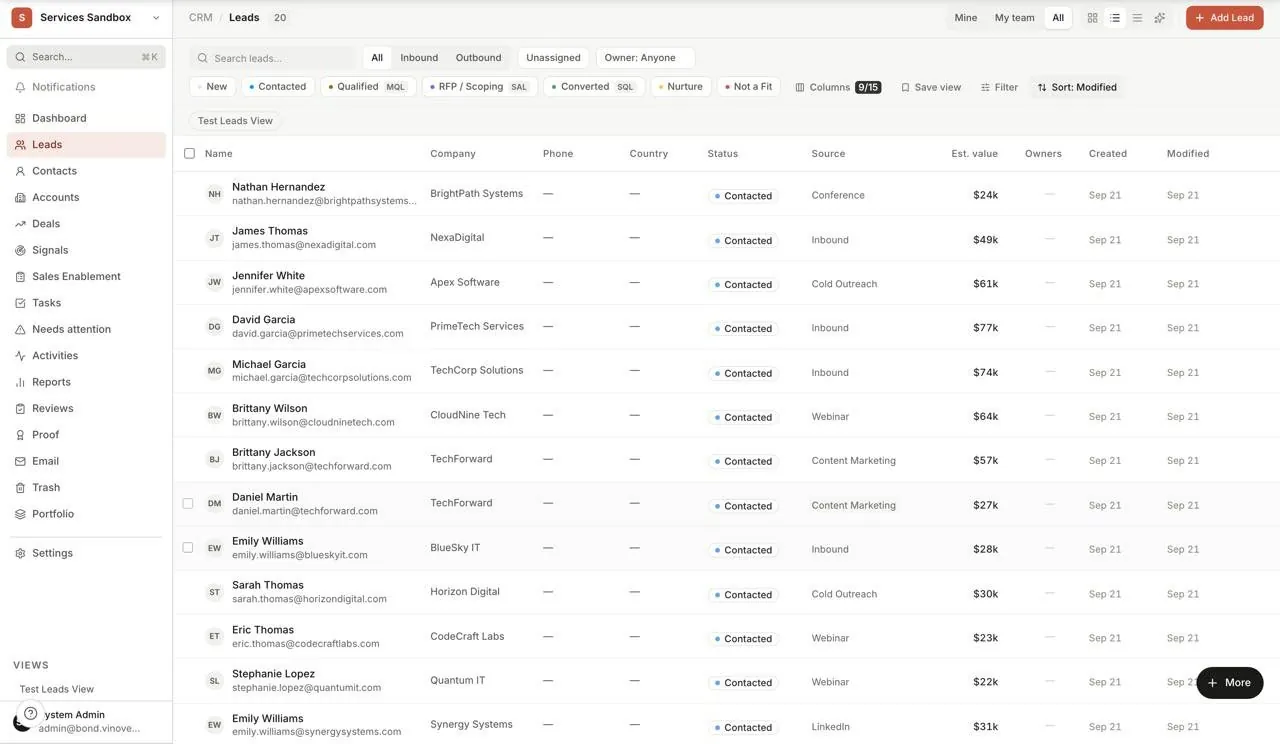
Leads: every lead your team is working
One screen lists every lead with its status, from new through contacted, qualified, RFP, converted and nurture, plus not a fit. Each row shows the company, the source it came from, its estimated value, its owner and when it last changed. Filters sit inline: mine, my team, inbound, outbound, unassigned. The status chips at the top double as counters, so the shape of the funnel is visible before you open anything.
Status, source and owner on every lead, sortable and searchable, so nothing sits in a spreadsheet nobody opens.
Sample data from a demo workspace, not a client's numbers - 02Bond · Lead record
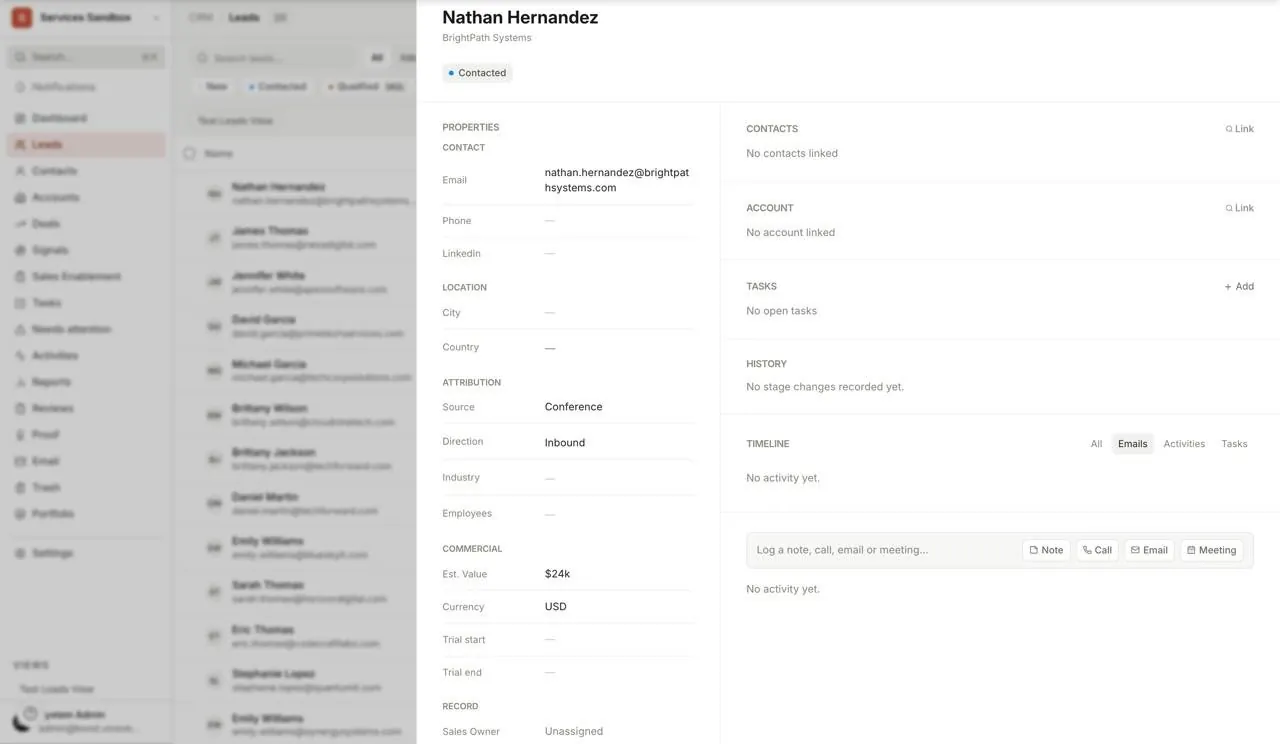
Lead record: everything about one lead
Open a lead and the contact details, the status, the source, the owner, the activity timeline and the next steps sit in one panel. Every call, email and note is on the timeline in order. Nothing is scattered across tabs, and when the lead is accepted or returned, that decision and its reason are kept on the record.
One panel per lead, with the full history and the next step, so a hand-off never loses context.
Sample data from a demo workspace, not a client's numbers - 03Bond · Deals
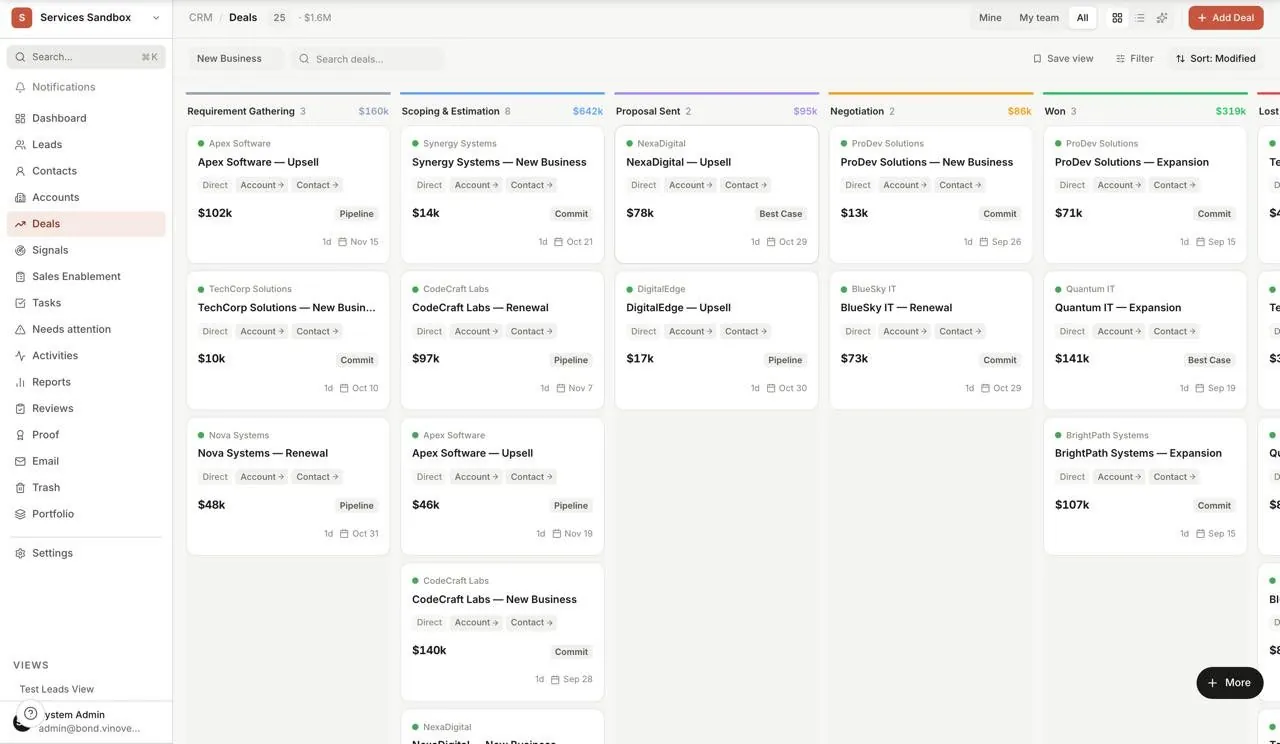
Deals: the pipeline as a board
Deals sit in stage columns with the running value shown at the top of each. Cards drag between stages. A deal record carries its value, stage, close date and the linked contacts and tasks, so the board is not a picture of the pipeline; it is the pipeline. Reports read from the same records.
The whole pipeline's shape at a glance, and every column total adds up from real deal records.
Sample data from a demo workspace, not a client's numbers - 04Bond · Needs attention
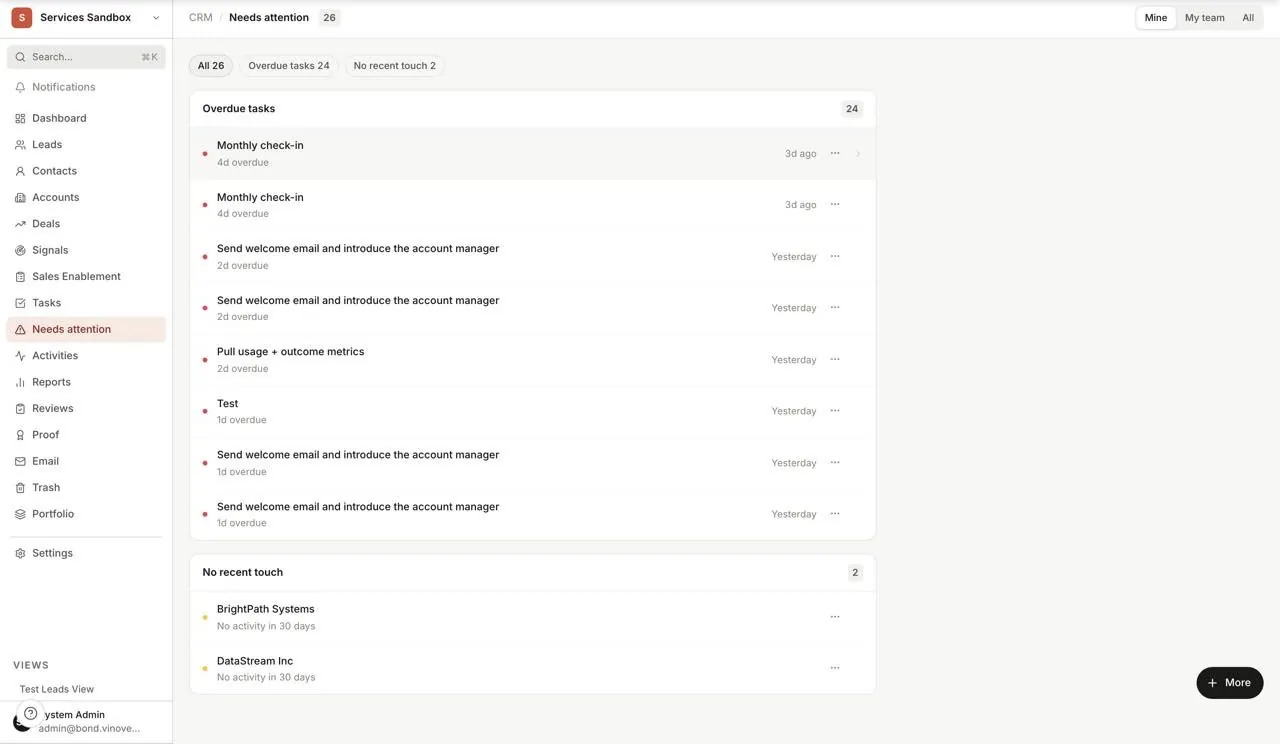
Needs attention: what is slipping
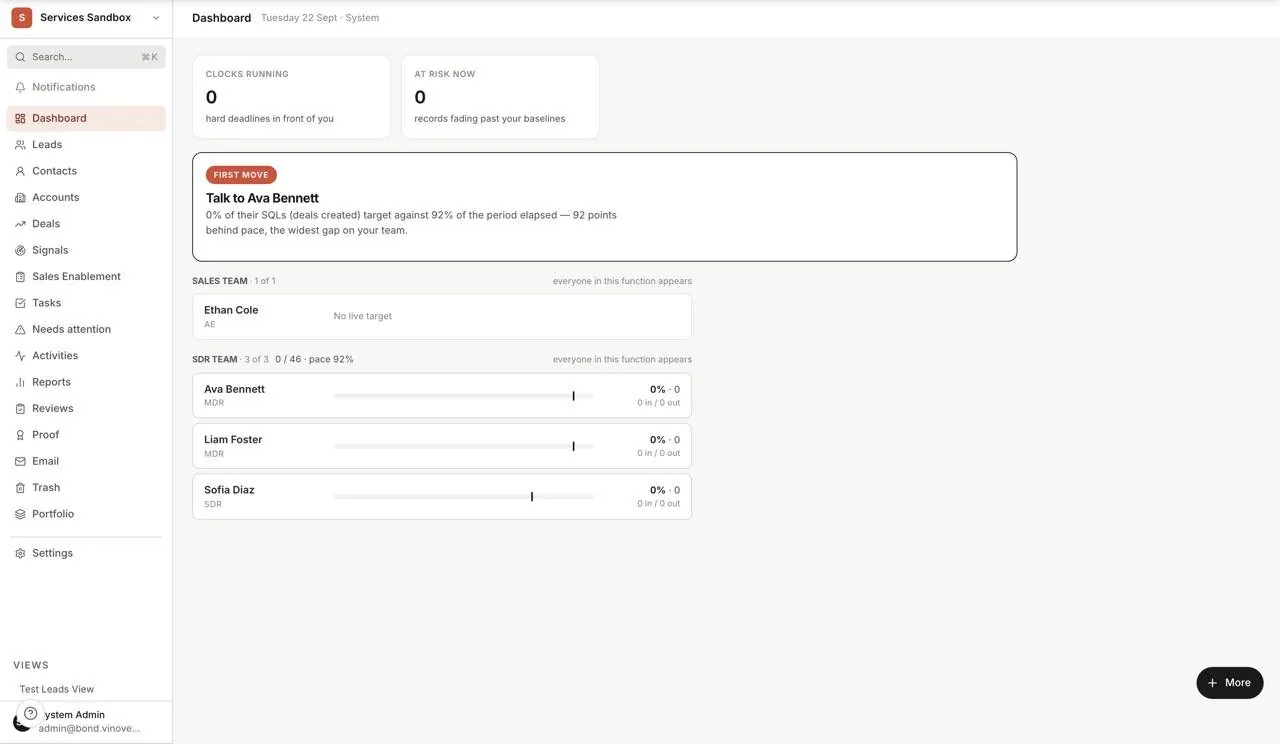
Overdue follow-ups and accounts that have gone quiet are surfaced automatically, each with its owner and how long it has been waiting. Nobody has to remember to check. The dashboard's 'first move' card, visible in the hero above, does the same for people: it names the representative furthest behind pace and says by how much.
The queue explains itself: each item says why it is there and who should act.
Sample data from a demo workspace, not a client's numbers - 05Bond · Signals
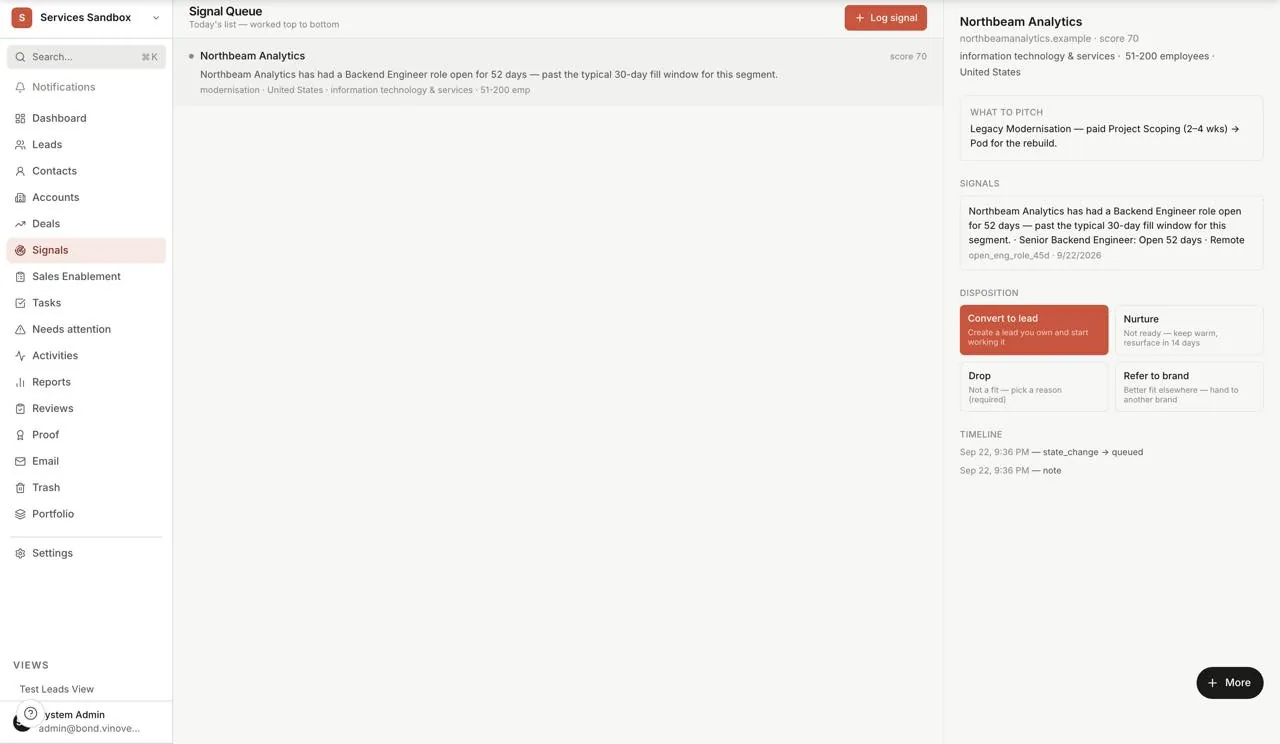
Signals: buying signals, with their evidence
Bond watches for the events that tend to precede a purchase, such as an engineering role left open past the typical fill window for that segment, and queues the company with a score. Each signal shows the evidence it fired on, with its source and date, and a suggested pitch. The representative works the queue top to bottom and records one of four dispositions: convert to a lead they own, nurture and resurface later, drop with a reason, or refer to another Vinove brand. Nothing becomes a lead until a person decides it should.
A signal names its evidence, so a rep can see exactly why it fired before deciding what to do with it.
Sample data from a demo workspace, not a client's numbers - 06Bond · Response audit
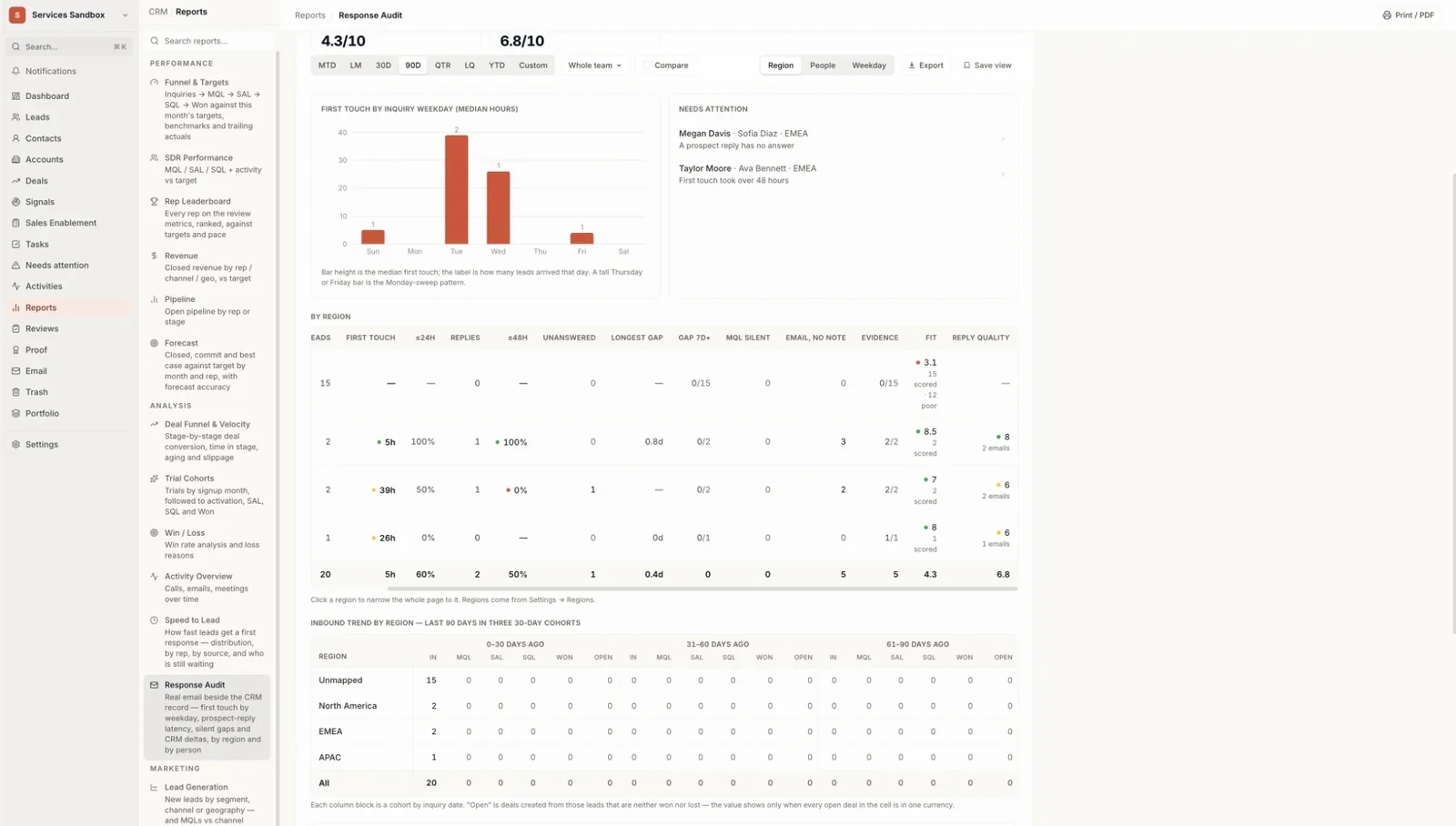
Response audit: how fast, and how well, we reply
The report reads each representative's real, synced email against the CRM record: how long the first touch took, how many prospect replies were answered within 48 hours, the longest silence, and where a lead sits with no note. Every inbound lead carries a fit score and every reply a quality score, each with a one-line reason drawn from the text itself. The needs-attention list names the lead, the owner and the reason, such as a prospect reply that has had no answer. This is the report we hold ourselves to on your pipeline.
Response speed and reply quality are measured from the actual email, per person and per region, not self-reported.
Sample data from a demo workspace, not a client's numbers - 07Bond · Reports
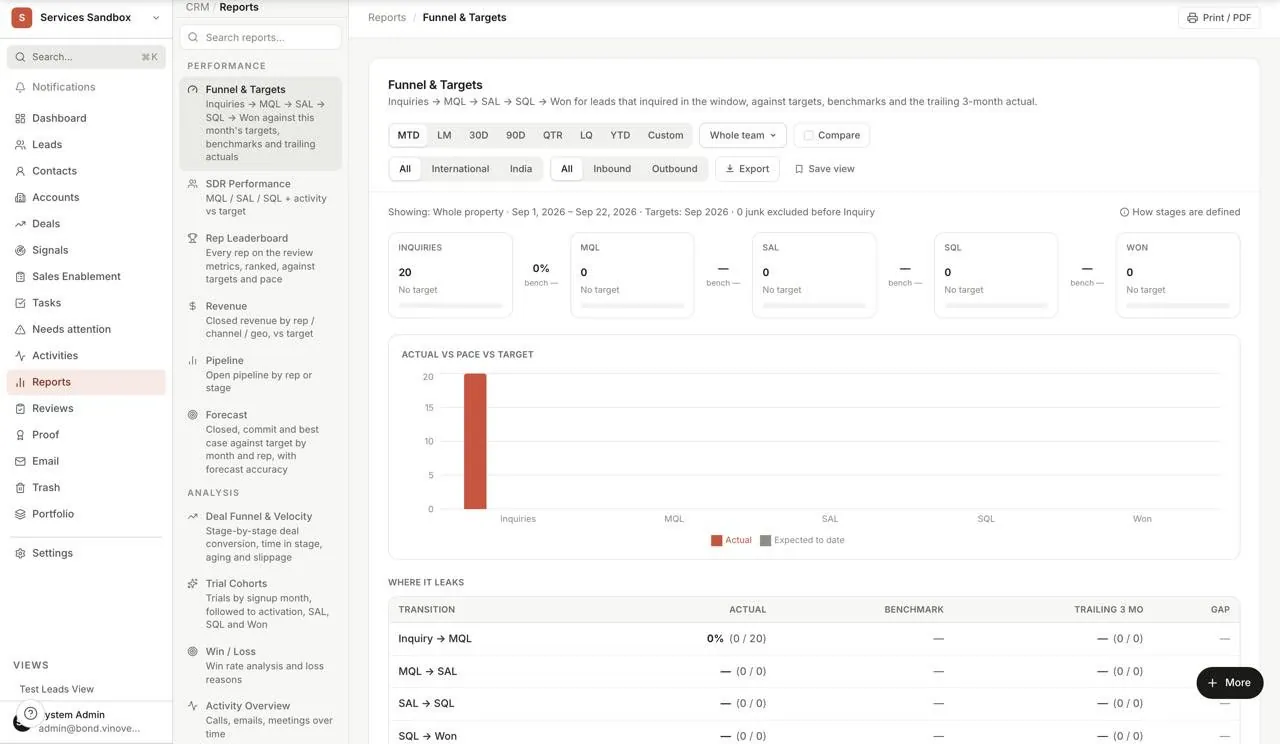
Reports: funnel, pipeline and targets
Funnel, pipeline and revenue reports are built in and read from the live records. The funnel-and-targets report puts each stage's count against its target, by channel and by owner. Every number drills down to the records behind it, so a figure in a report is never a figure you have to take on trust.
Every number in a report opens the records it was counted from.
Sample data from a demo workspace, not a client's numbers - 08Bond · Reviews
Reviews: coaching from the record
Each representative rates their own week, the manager signs it off, and the result is kept as a rolling red, amber and green history. The review is written against the numbers in the pipeline, so the conversation starts from what happened rather than from memory.
Self-rating, sign-off and a history per person, so accountability is in the open.
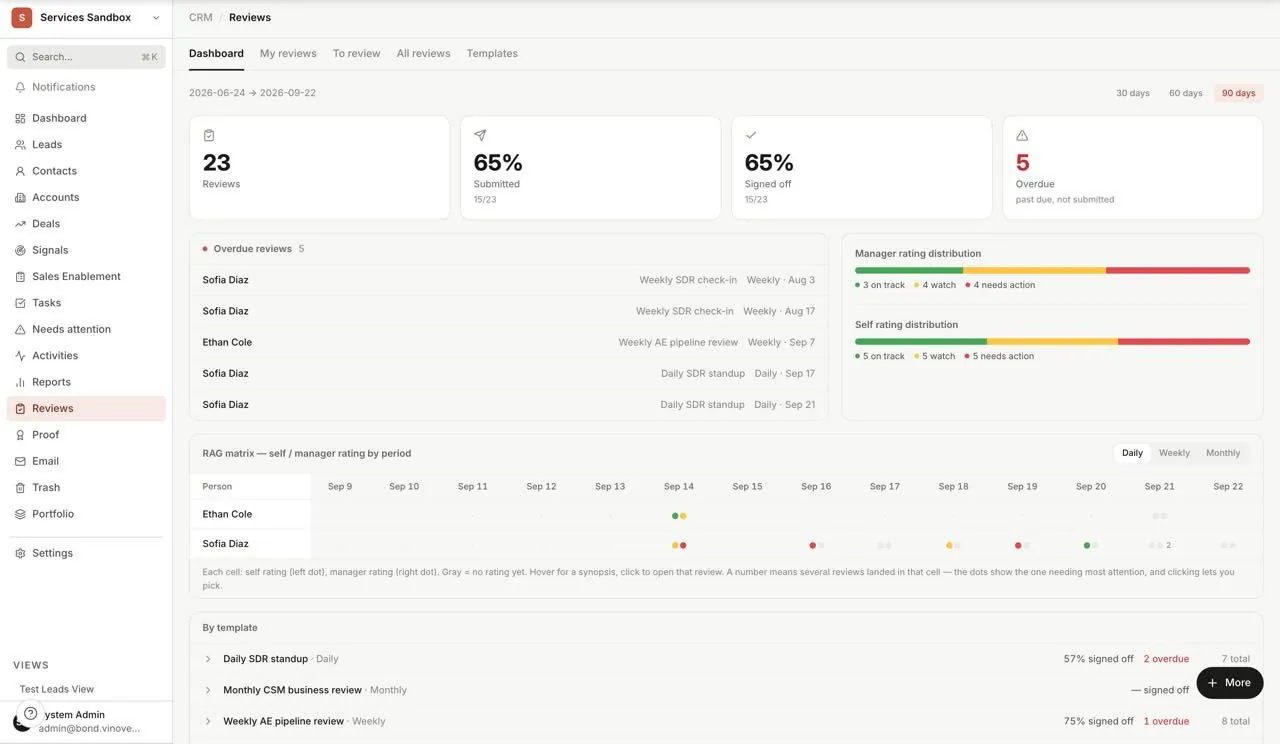
Sample data from a demo workspace, not a client's numbers
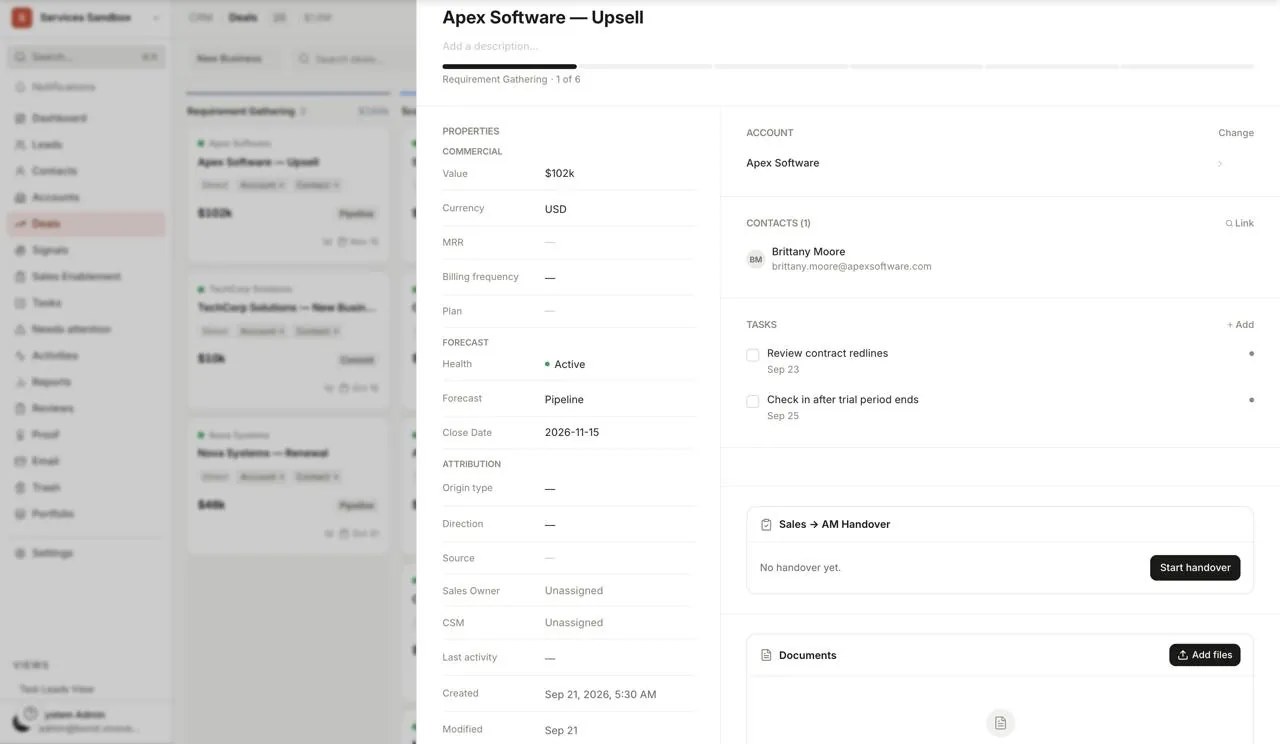
Deal record: value, stage, close date, linked contacts and tasks in one panel.
Bond · Deal record · Sample data from a demo workspace, not a client's numbers
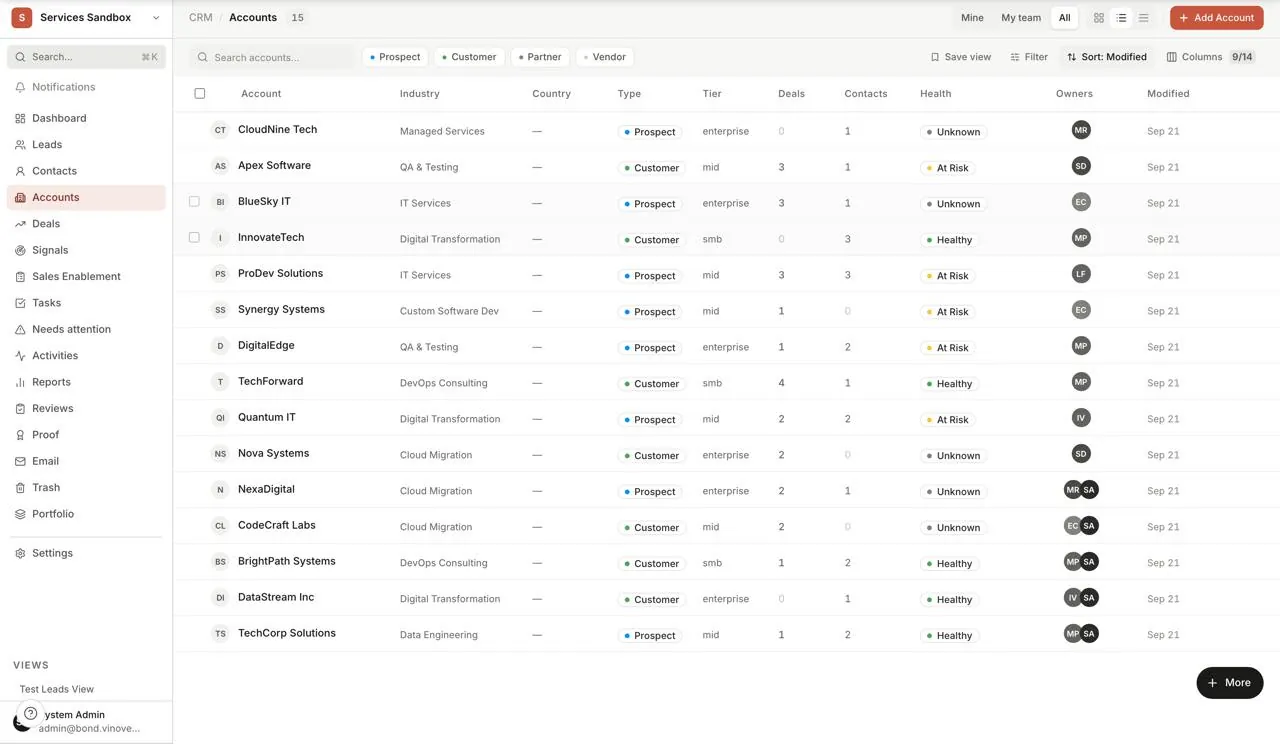
Accounts: every company sold to or served, with industry, size and owner.
Bond · Accounts · Sample data from a demo workspace, not a client's numbers
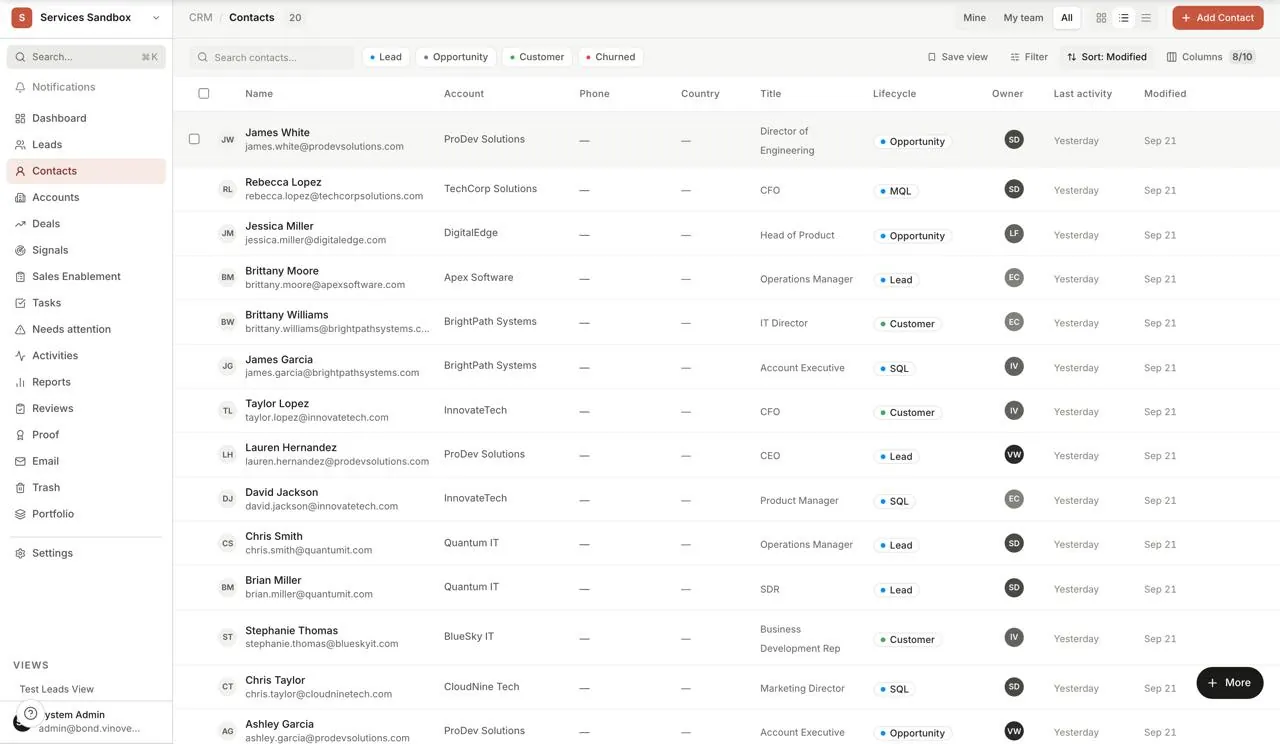
Contacts: every person tied to an account or a deal, searchable and filterable.
Bond · Contacts · Sample data from a demo workspace, not a client's numbers
Revenue as a working discipline,
not a record.
Stages and ownership
Configurable stages, source types, stage age and ownership history keep how a deal moved, not only where it sits now.
Targets and pace
Per-person and team targets, with each person's pace against the period elapsed on the dashboard, so accountability is visible.
Follow-up timing
Overdue follow-ups and quiet accounts surface in the attention queue on their own, instead of relying on someone's memory.
Buying signals
Hiring, funding and technology events that tend to precede a purchase, queued with their evidence and a suggested pitch; a person decides what becomes a lead.
Response audit
First-touch speed, replies within 48 hours and silences, read from real synced email per person and region, with a fit and reply-quality score on every lead.
Structured reviews
Self-rating, manager sign-off and a rolling history per person, written against the pipeline's own numbers.
Reports that drill down
Funnel, pipeline and revenue reports read from the live records, and every number opens the records behind it.
The proof library
Cases, testimonials and samples linked to the account they came from, with consent and embargo recorded separately from completion.
Commercial evidence,
with permission attached.
Case studies, testimonials and work samples stay linked to the account they came from. Four rules keep a strong story from becoming an unauthorised one.
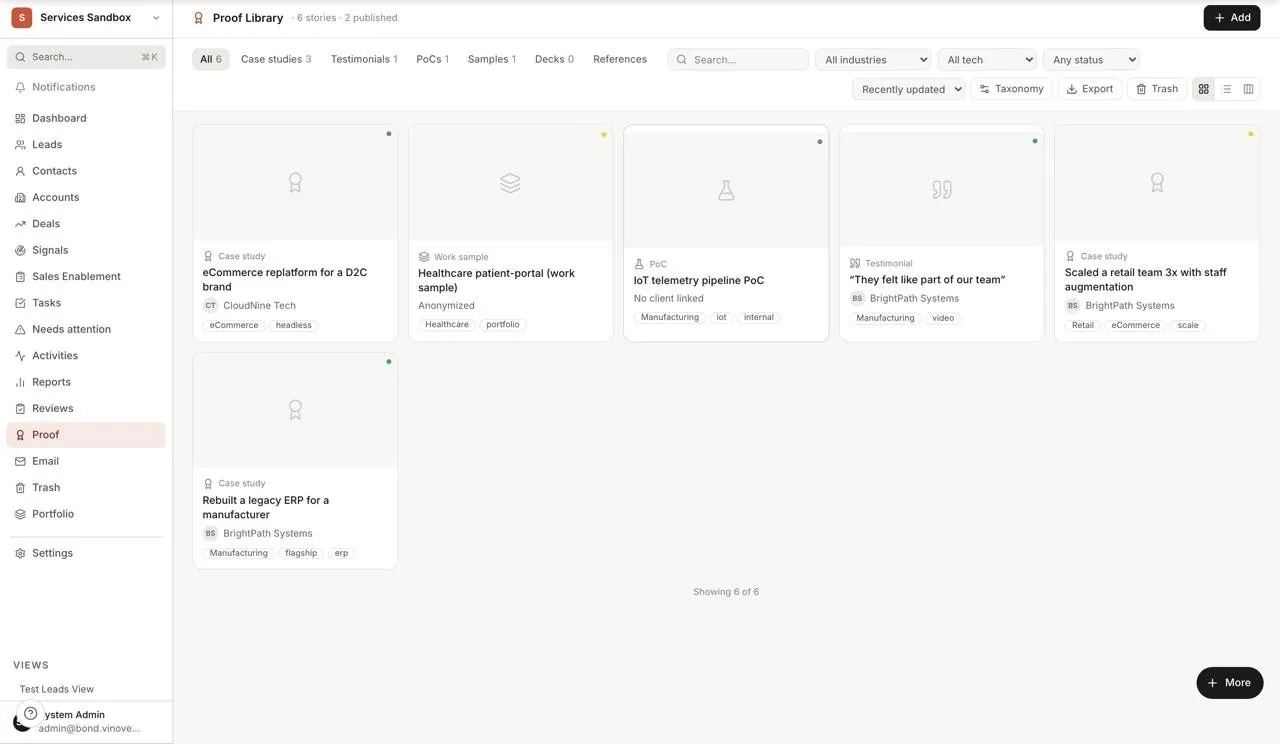
Proof library: each case linked to its account, with its consent and embargo state beside it.
Bond · Proof library · Sample data from a demo workspace, not a client's numbers
- 01
Finished is not published
A case can be complete and still not approved for external use.
- 02
Consent and embargo are separate
A published asset may still carry limits on when, where and how it is used.
- 03
Proof is not a reference
A strong story and permission to approach the customer are governed separately.
- 04
One vocabulary
Industry, technology and service classifications, so a case is findable later.
This is the library behind our own proof pages. A quote or a case appears on this site only when its consent state allows it.
Commercial context crosses.
Customer identity does not.
Prism needs to know what the demand became. It does not need to know who the customer is. Bond strips contact identity before anything leaves it; Prism reads through a purpose-scoped connection, not a shared database.
- Channel and campaign context
- Geography
- Funnel stage history
- Disqualification reason
- Won status
- Names, emails and phone numbers
- Companies and linked accounts
- Raw descriptions and notes
- Deal values
No evidence,
no assumption.
A score shows its reasons. A failed load does not become all clear. A queue can leave out unsupported items and say that it did. Every figure carries one of three states, and the interface stays quiet so the evidence, not the decoration, is the loudest thing on the page.
- SupportedThe evidence exists and the item shows where it came from.
- LimitedSome evidence, with the gap named beside the figure.
- No evidenceShown as missing. Never turned into a score that looks complete.
Prism and Bond are proprietary Vinove operating infrastructure and are not licensed standalone.
Frequently
asked.
Only where we run pipeline for you: demand generation into a sales team, with a sales-acceptance step in the middle. Then Bond records each lead from first contact to customer and hands the outcome to Prism. On an engagement with no pipeline to run, a build or a redesign for instance, Bond does not appear and Prism carries the work alone.
An MQL met the marketing definition of a good lead. An SAL is one the salesperson agreed to work; this is the hand-off, and it is the number Prism uses for cost per SQL. An SQL is a qualified opportunity moving through pipeline stages with its age tracked. The step that matters is acceptance, because it is the first point where sales, not marketing, has judged the lead.
It goes back with a structured reason, not a shrug: wrong fit, wrong timing, wrong contact, duplicate. Those reasons are kept and visible, so the next marketing review can see what a rejected lead looked like and change the targeting, the qualification rule or the form. A rejection is evidence, and Bond keeps it.
No. Prism receives attribution and funnel context through a purpose-scoped connection: channel, campaign, geography, stage history, disqualification reason and won status. Names, emails, phone numbers, companies, linked accounts, notes and deal values stay in Bond. Marketing learns what the demand became without receiving who the customer is.
Where we run the pipeline, yes: the salespeople who accept and work the leads use Bond, with their own logins, targets and reviews. Where you already run a CRM you want to keep, we can read acceptance from it instead. Tell us which it is and the proposal will say how the hand-off works.
Nothing about your engagement is published without a consent state that allows it. A finished case is not a publishable one; consent, embargo and reference permission are three separate records, and each one is agreed with you. Our own testimonials and case studies pages are drawn from this library.
No. Bond is proprietary Vinove operating infrastructure and is not licensed or sold standalone. It is the system PixelCrayons runs pipeline in when a client asks us to, and you see it through the engagement rather than through a licence. Your existing CRM stays yours; Bond is where our accountability for the pipeline lives.
The rest of
the loop.
See the pipeline
before you run one.
Start with the free website review. Where a pipeline is the right next step, the proposal says how Bond fits, and a walkthrough shows you the screens on a call.
Reply inside 48 hours · Free · No retainer required
Last updated